
There’s much more to running an editorial business than grammar and style guides. Over close to 20 years of freelancing, I’ve developed nine essential pieces of non-editorial documentation. These records, tools and resources bring clarity, help me plan with purpose and keep my business running smoothly.
Your style sheets are slicker than a greased exclamation mark and your style sheet template is perfectly balanced between concise and comprehensive. Your macros are practically doing the editing for you (well, not quite…) and your text expander contains template author queries that can handle just about anything a client can throw at you.
In other words, you’ve got this editing thing down pretty well. But what about your wider business? What strategic and administrative documentation have you set up and how well is it working for you? Does it enable you to understand what’s going on in your business now, what happened in the past and how to achieve your future goals?
This post looks at some of the essential non-editorial documentation you might want to consider setting up. If I were to go back to the beginning and start my business afresh, setting up this documentation would be one of my first tasks.
Before we get started, a quick note: it’s important to understand that these ‘documents’ don’t necessarily have to be separate – it’s perfectly OK to address two, three or more of the functions below in a single document or other environment. Do what works best for you.
1. Scheduling and workload
Let’s start with the absolute basics. You’ll need somewhere to write down all the work you have booked in, any prospective work beyond that, and all the key dates. You should also estimate how many hours each block of work will take you. From this basic information, you can then plan long term (so you know when you’re free for additional work) and short term (so you can see in detail how you’ll meet your immediate commitments).
There are endless options for scheduling, from a humble spreadsheet (such as Google Sheets) to project management software (such as Trello and Zoho Projects) to business management tools (such as 17hats, Dubsado and Notion).
I record my schedules and key tasks in my project management software (currently Zoho Projects, but I’m exploring other options). This has a built-in tool that shows my capacity (how much space I have left for new projects) over the coming weeks or months (long-term planning). I also use this data to draw up a handwritten plan every two weeks showing exactly when I will complete individual tasks (short-term planning).
The image below is a simplified mock-up of one of my two-week plans. On the left is a list of all the projects that will have some sort of activity over the next two weeks. Brackets signal projects that are in the background and unlikely to require active work; ticks mean I have inputted all work for the project into the grid on the right. In the grid, the circled numbers are days of the week and an exclamation mark means I have holiday or some other potentially disrupting commitment on that day.
Non-paid work and general admin are not scheduled as my project scheduling deliberately leaves time free for those tasks over the course of the week. I do, however, note down specific events, such as client calls and webinars. ‘X’ is an important prompt – I use this to mean ‘answer non-project emails and do any other ad hoc bits and pieces that need to be done today’.
As I complete projects and work, I cross them off (the cross-outs in this mock-up are as if I were halfway through day 2 of week 1).
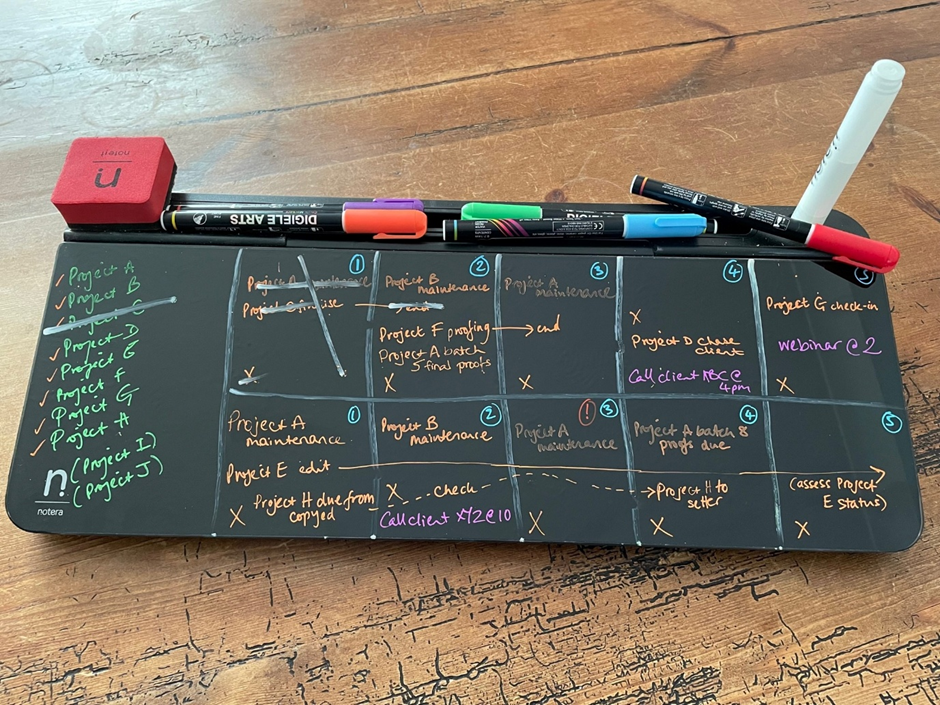
There are endless ways to achieve this kind of short-term plan – or you might feel no need for any sort of manual plan if your scheduling software can generate one for you. I like to have a written short-term plan, but explore different options to find what works for you.
2. Word counts, fees and time
This is where you get into the nitty-gritty of your day-to-day work. How quickly can you edit? Does it vary by client, type of work or subject matter? Are you happy that the amount you’re being paid fairly compensates you for the amount of work you’re putting in? Can you make a reasonable estimate of how long a potential project might take?
Recording word counts, fees and the time you take will enable you to answer these questions and many more. The answers will feed into your reporting (see ‘Strategy and reporting’ below) and also help you to control your workload (and hence take care of your mental wellbeing).
The system you choose for your scheduling may have the ability to record these details, or you might want to set up a specific spreadsheet for the purpose. For time tracking, some editors use tools such as Toggl, which can integrate with other software.
3. Finances
You’ll need some sort of way of tracking invoices raised, whether they’ve been paid and any expenses. Obviously this should be in a format that enables you to meet the tax reporting requirements in your region. Beyond that, the level of detail and the format are up to you.
You might find specialist software helpful, but a spreadsheet (perhaps with some conditional formatting to flag when an invoice is overdue) can be more than enough. You might even just add a couple more columns to your scheduling spreadsheet to record when a project has been invoiced and paid.
A hard-earned tip is to actively track your cashflow too. By this I mean forecasting when you expect future payments to arrive (for all upcoming projects – not just the ones you’ve already invoiced) and your anticipated expenses (including the ‘salary’ you pay yourself). Although cashflow forecasting can take a bit of time, it can really help your mental wellbeing as it helps you plan and avoid surprises.
Find out more: Susie Jackson has a lot of great tips on clear financial thinking for freelancers on her blog, and Claire Owen-Jones posts wisely and entertainingly on LinkedIn about finance for freelancers.
4. Leads, enquiries and quotes
This is all about tracking:
- who’s contacted you and the nature of their enquiry
- the approaches you’ve made to potential clients
- the status of any ongoing discussions (e.g. if you’ve sent out a quote and are waiting for feedback)
- the final outcomes of all these discussions – at a minimum, whether work was agreed or not, but I’d also recommend recording why work didn’t go ahead (e.g. fee, schedule, unsuitable project) so you can identify and act on any patterns
The scale and format of this document will vary hugely from freelancer to freelancer, depending on the nature of their business and what they’re trying to achieve. You might want a complex CRM-type system that enables easy day-to-day tracking and communication with clients (some of the software options mentioned above can help you do this). Alternatively, as always, a simple spreadsheet might serve you very well. Just make sure your chosen tool has the capacity to record everything you’ll want to report on (see ‘Strategy and reporting’ below).
5. Marketing
Although I still don’t think of myself as anything near a marketing expert, I’ve needed to step up my marketing game since I launched my first two editorial courses. My main tracking tool is a spreadsheet where, for each marketing activity, I record:
- the start and end dates
- the product or service the marketing activity relates to
- the channel (e.g. LinkedIn posts, a directory listing or my website)
- any audience I’m specifically trying to reach (e.g. a specific type of editing client)
- any collaborator(s) (people and businesses I’m working with on the activity)
- a description
- details of the effect
- the current status
- any additional notes
You can download my fully editable marketing log template to get you started.
All of my marketing activities are heavily influenced by my strategy document (see ‘Strategy and reporting’ below).
Find out more: For marketing insights specific to editing and proofreading, check out Malini Devadas’ excellent Edit Boost podcast (on pause as of May 2025, but with lots of past episodes) and the wealth of resources provided by Louise Harnby.
6. Log of positive feedback and lessons learned
As advocated by Erin Brenner and many others, the ‘win jar’ is a hugely important morale booster, especially for freelancers, who spend much of their time working in isolation. Whether you choose an actual jar, yet another spreadsheet or an A1-size poster of your greatest hits to hang on the wall, it’s wise to remind yourself of all the positive comments you’ve received. After all, if you don’t keep in mind what your clients appreciate, it’s harder to deliver on their needs.
At the same time, though, a modest log of lessons learned can be a really valuable tool (I’ve written more on this topic in my article Capitalizing on feedback and embracing fragility). I always make sure to briefly record when I make a mistake or something doesn’t go to plan – for example, if I take on a project with red flags and then regret it, or if there’s a miscommunication with a client that I could have avoided. I then make sure to plug the gaps by taking action to avoid the same thing happening in the future – for example, by updating my checklist of ‘things to consider’ when evaluating a potential new project or by updating my quote package so future clients hopefully won’t experience the same misunderstanding in the future.
7. Professional development log and planning
It can be helpful to keep a list of the continuing professional development (CPD) activities you’d like to do. Otherwise it can be easy for months or even years to slip by in which you’ve completed an awful lot of projects but not furthered (or even maintained) your skillset at all.
It can be particularly helpful to use this document to plan the time and financing needed for any ‘big’ courses, such as learning a brand new skill. But it’s also good to jot down books, podcasts, websites and the like that can help you keep up to date with developments relevant to your field.
8. Terms and conditions
Some clients will expect you to adhere to their own terms and conditions (T&Cs) or sign a contract. But in many cases (especially if you’re working with non-publisher clients) there is scope to create your own T&Cs or contract.
The purpose of this document is to let the client know the legal and practical implications of doing business with you. It protects both of you and establishes fundamental expectations for the relationship.
I think of my T&Cs as a document that evolves with my business and I update it at least annually.
Find out more: I’m told that the short book The Paper It’s Written On: Defining your relationship with an editing client, by Karin Cather and Dick Margulis, is helpful for crafting your own T&Cs.
9. Strategy and reporting
Not everyone starts their business with a fancy formal business plan. But at some point you’ll probably find it helpful to write down all those ‘what ifs’ and ‘maybe I coulds’ and ‘I think I’d like tos’ in a single place to keep track of them. The purpose of this document is to set out what you want your business to do for you and how you plan to achieve that.
Your goals can be as grand or as simple as you like. For example, you might want to write a detailed financial and marketing plan to help you completely change your client base over the next three years. Or you might prefer to keep things roughly as they are but achieve a modest hourly rate increase each year.
Where this becomes really powerful is when you pair it with reporting on how your business has performed in the past. I’ve written about how and why I write an annual report for my business here and here. Once you understand your past performance, you’re better able to set realistic future goals and can make wiser decisions about what you want your business to achieve for you.
I do my strategy and reporting in Google Docs and use this information to populate to-do lists in Trello with the actions I’ve chosen to keep me on track. Your reporting data will come from all the sources above – you’ll just be viewing it in the rear-view mirror.
Stay flexible
When you’re choosing how to address each of the areas above, keep in mind that your documentation should be flexible, manageable and focused on outcomes rather than tracking for its own sake. It should also be capable of evolving – after all, who knows what you’ll want your business to be doing in five, ten or even twenty years’ time?
More resources
The Going Solo toolkit, written by editor Sue Littleford for the Chartered Institute of Editing and Proofreading, includes a collection of Excel spreadsheets that are set up to record most of the information covered in this post. It’s free to CIEP members.
The Editor’s Affairs (TEA) is another series of Excel spreadsheets designed specifically for editors to keep track of their business data.
Erin Brenner’s book The Chicago Guide for Freelance Editors: How to take care of your business, your clients, and yourself from start-up to sustainability is – as the title suggests – a comprehensive guide to every angle of running an editorial business.
The An American Editor blog contains numerous articles on the business of editing.
Editor Lisa de Caux has useful tips on setting up a operations manual for your freelance editorial business.
This is a revised version of an article originally published on the Chartered Institute of Editing and Proofreading website as ‘Core business documentation for freelance proofreaders and editors’.


Hello Hazel;
I just wrote you and shyly indirectly asked for advice. This post is chock full of ideas I will be studying for sure. Thank you so much!!
Katie
You’re very welcome, Katie! I’ve replied to your question on LinkedIn.